
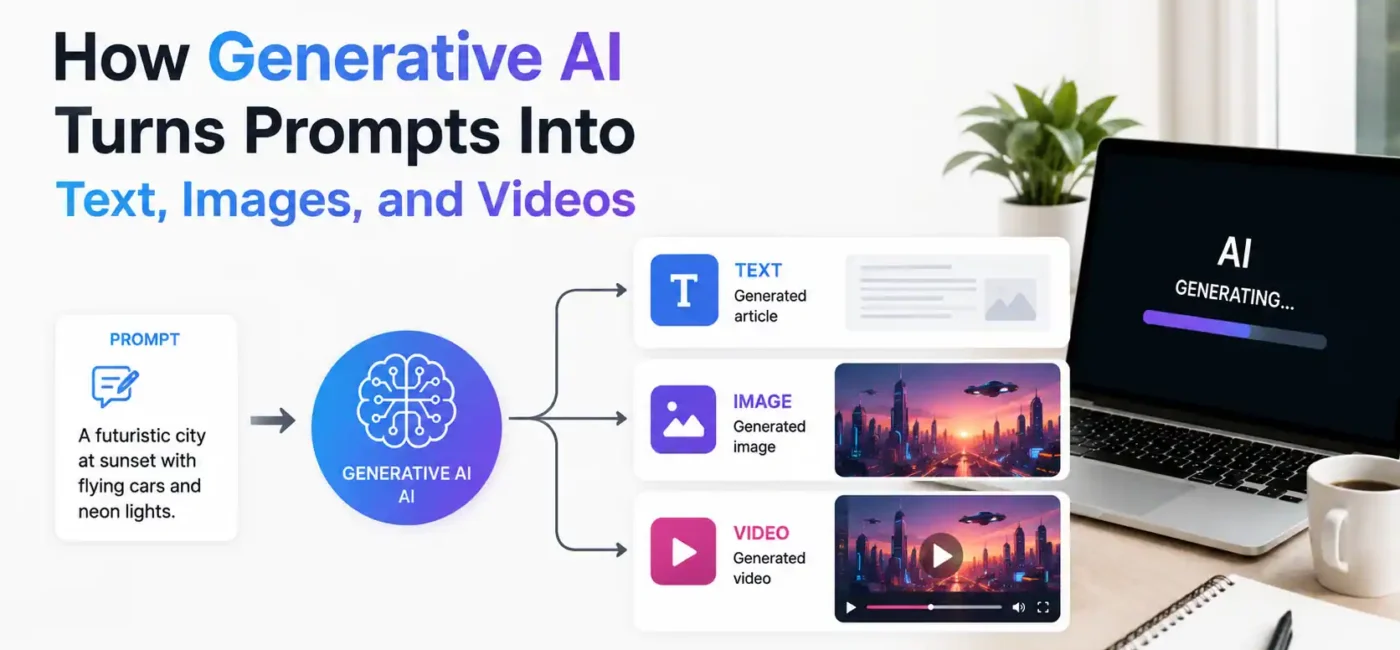
You type a sentence. A few seconds later, a full article, a photorealistic image, or a video clip appears. That gap between input and output is not magic. It is a chain of mathematical operations across trained neural networks, and once you understand each step, the outputs stop feeling mysterious and start making a lot more sense. This guide walks through exactly how each modality works: text, images, and video. It is written for AI students and anyone who wants more than a surface-level explanation.
What is generative AI?
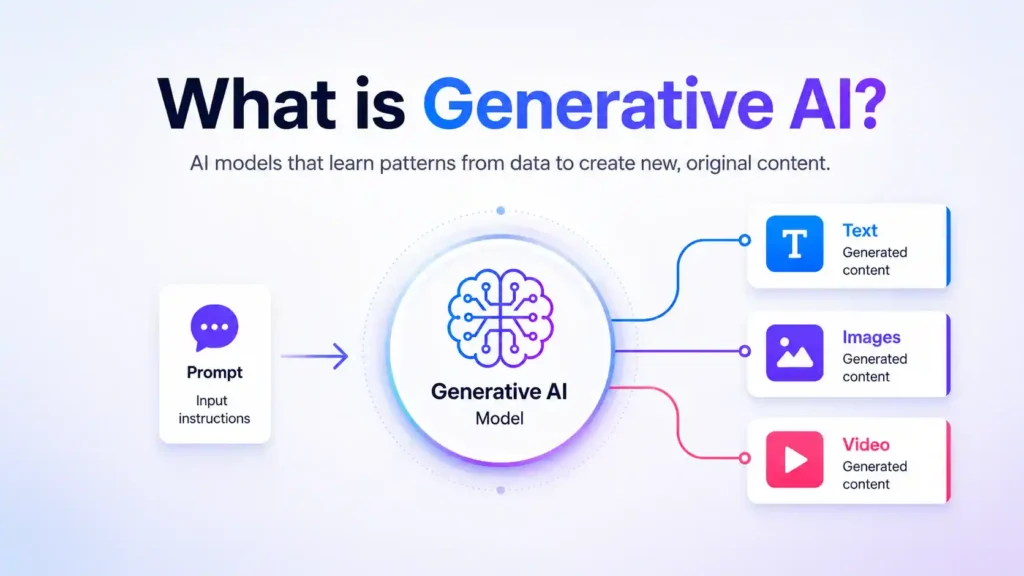
Generative AI refers to machine learning models that produce new content by learning patterns from large datasets and generating outputs in response to input instructions, called prompts. Traditional AI classifies or predicts. Generative AI creates. It does not retrieve a stored answer. It builds a new one, token by token or pixel by pixel, based on what it learned during training. The three output types covered here are text, images, and video. Each one works through a different mechanism, though they share underlying architecture.
How generative AI turns prompts into text
Text-generation tools are primarily powered by Large Language Models, commonly known as LLMs.
Examples include GPT models, Gemini, Claude, and LLaMA.
These models are trained using huge collections of written material. During training, they learn patterns in language, including grammar, sentence structure, relationships between words, common facts, writing styles, and how different ideas are usually connected.
Popular examples include ChatGPT by OpenAI, Gemini by Google, Claude by Anthropic, and Llama by Meta. An LLM primarily works by predicting what comes next in a sequence.
Let us look at the process step by step.
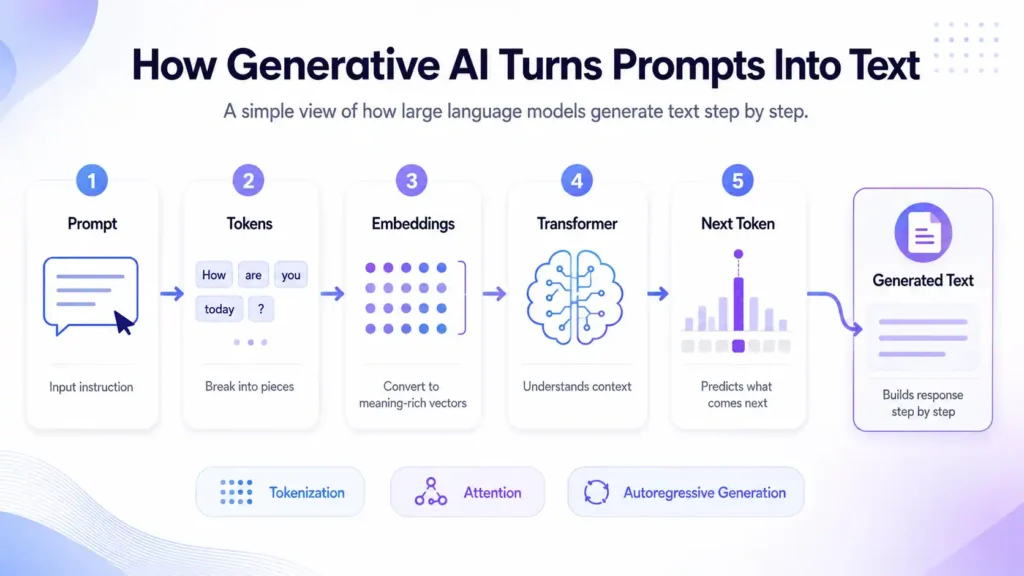
Step 1: The Prompt Is Broken Into Tokens
The first thing the model does is not “read” your sentence in the same way a human does.
Instead, it breaks your prompt into smaller pieces called tokens.
A token may be:
- A complete word
- Part of a word
- A punctuation mark
- A symbol
For example, a common word may appear as one token, while a longer or unusual word may be divided into several smaller tokens.
This process is called tokenization. Each token is then assigned a numerical ID because neural networks work with numbers rather than ordinary written words.
So, before the AI begins writing its answer, your sentence has already been converted into a numerical format that the model can process.
Step 2: Tokens Are Converted Into Embeddings
The first thing the model does is not “read” your sentence in the same way a human does.
Instead, it breaks your prompt into smaller pieces called tokens.
A token may be:
- A complete word
- Part of a word
- A punctuation mark
- A symbol
For example, a common word may appear as one token, while a longer or unusual word may be divided into several smaller tokens.
This process is called tokenization.
Each token is then assigned a numerical ID because neural networks work with numbers rather than ordinary written words.
So, before the AI begins writing its answer, your sentence has already been converted into a numerical format that the model can process.
Step 2: Tokens Are Converted Into Embeddings
Token IDs alone do not contain enough useful information about meaning.
The model therefore converts each token into something called an embedding.
An embedding is basically a long list of numbers representing different characteristics of a word or token.
Words that are used in similar contexts often have similar representations.
For example, terms such as:
king, queen, prince, and royal
may appear closer together in the model’s mathematical representation than unrelated words such as:
banana, engine, or rainfall.
The model also needs to know the order in which words appear.
Consider these two sentences:
The dog chased the cat.
and
The cat chased the dog.
They contain almost the same words, but their meanings are different because the order changes.
For this reason, information about token position is also added before the text moves deeper into the model.
Step 3: The Transformer Processes the Prompt
The Transformer is one of the most important technologies behind modern language models.
The architecture became widely known after the 2017 research paper Attention Is All You Need.
Transformers allow models to examine relationships between different parts of a sentence instead of treating every word separately.
A major part of this process is called attention.
Self-Attention
Self-attention helps the model determine which words in a sentence are related to one another.
Imagine the sentence:
“Sarah placed the laptop on the table because it was heavy.”
To understand what “it” refers to, the model considers the surrounding words and their relationships.
Attention mechanisms assign different levels of importance to different tokens so that the model can build a better representation of the overall meaning.
Multi-Head Attention
Transformers do not perform only one attention calculation.
They use several attention mechanisms at the same time. This is known as multi-head attention.
Different attention heads can focus on different relationships, such as:
- Grammar
- Word meaning
- Long-distance connections
- Sentence structure
- Context
The information is then passed through additional neural-network layers that continue refining the representation.
These layers work together to help the model decide what type of response would best fit the prompt.
Step 4: The Model Predicts the Next Token
Once the prompt has been processed, the model begins generating its answer.
It calculates probabilities for possible next tokens.
Suppose the prompt is:
“Artificial intelligence is changing the…”
The model may assign probabilities to words such as:
- world
- industry
- way
- future
- workplace
Instead of knowing the sentence in advance, the model selects one possible token based on these probabilities.
That token becomes part of the generated response.
The model then predicts the next token.
Then the next.
And the next.
This continues until the complete response is produced.
This process is known as autoregressive generation.
In simple words:
Prompt → predict next token → add token → predict again → continue until finished.
Step 5: How the Model Chooses Words
AI systems do not always select the single most likely token.
Different generation settings can change how responses are produced.
Greedy Decoding
The model chooses the token with the highest probability every time.
This can make the output predictable and sometimes repetitive.
Beam Search
The model keeps several possible sentence paths and compares them before selecting a stronger sequence.
Temperature
Temperature affects creativity and randomness.
A lower temperature usually creates more predictable responses.
A higher temperature can produce more varied or creative answers.
Top-p Sampling
Top-p sampling allows the model to choose from a smaller group of tokens that together represent most of the probability.
This helps balance creativity with relevance.
Step 6: Instruction Tuning Makes the Model More Helpful
A model trained only to predict text would not automatically behave like an AI assistant.
It may continue sentences successfully but fail to follow instructions properly.
Additional training is therefore used.
Supervised Fine-Tuning
During supervised fine-tuning, models learn from examples containing instructions and suitable responses.
For example:
Instruction: Explain photosynthesis to a 10-year-old.
Response: A simple explanation designed for a young learner.
The model learns what a useful response should look like.
Human Feedback
Human reviewers can also compare different AI responses and indicate which ones are more helpful, accurate, safe, or relevant.
This feedback can be used to improve the system further.
The result is an AI model that does more than continue text. It becomes better at answering questions, following instructions, maintaining an appropriate tone, and responding in a structured manner.
How Generative AI Turns Prompts Into Images
Image generation works differently from text generation. Many modern image-generation systems use a process known as diffusion. Popular generative image systems have used diffusion-based techniques because they can create detailed images from text descriptions. The main idea behind diffusion is surprisingly simple. Imagine taking a clear photograph and slowly adding random visual noise until the picture becomes almost impossible to recognise. A diffusion model learns how to reverse that process. Instead of adding noise, it learns how to gradually remove noise until a meaningful image appears.Popular examples include ChatGPT Images by OpenAI, Midjourney, Stable Diffusion by Stability AI, and Adobe Firefly.
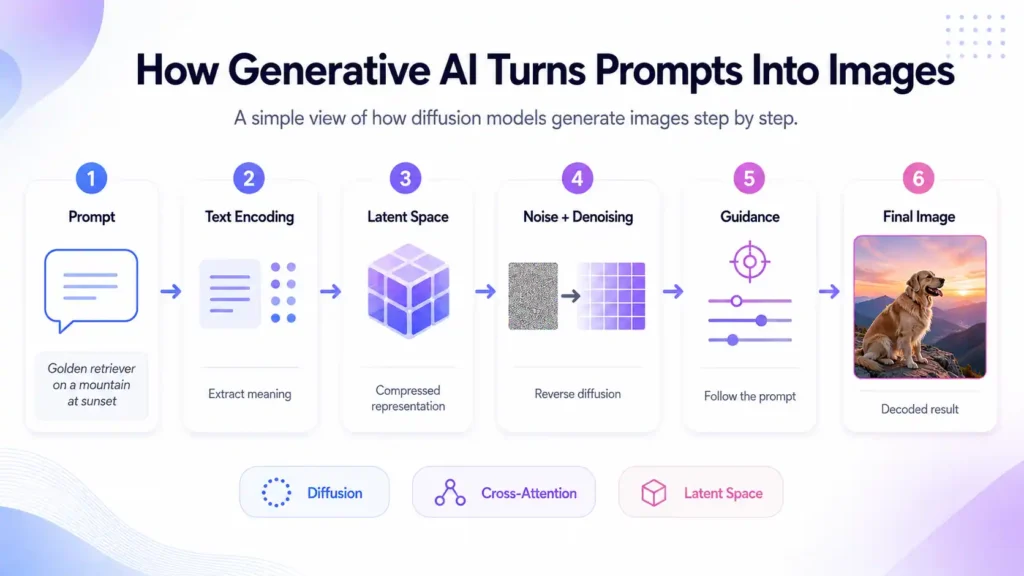
Step 1: The Image Prompt Is Encoded
Suppose you enter this prompt:
“A golden retriever sitting on a mountain during sunset, photorealistic.”
The AI first needs to convert those words into a mathematical form.
A text encoder processes the prompt and creates a representation of its meaning.
Important ideas may include:
- Golden retriever
- Mountain
- Sunset
- Photorealistic style
This encoded information guides the image model during generation.
Without this connection between language and visual information, the model would not know what kind of picture you requested.
Step 2: The Model Works in Latent Space
Generating every individual pixel directly can require a huge amount of computing power. Some diffusion systems therefore work in a compressed mathematical environment called latent space. Think of latent space as a smaller representation of an image. Instead of processing millions of individual pixel values, the system works with a compressed version containing the important visual information. A technology such as a Variational Autoencoder, or VAE, can help compress images into latent representations and later convert them back into normal images. This makes the generation process more efficient.
Step 3: Generation Begins With Noise
Unlike an artist starting with a blank white page, a diffusion model commonly begins with random noise. At first, the data may look similar to television static. The AI then removes a small amount of noise. After another step, the image becomes slightly more structured. The process continues again and again. Gradually, shapes begin to appear. Those shapes become objects. The objects become a complete scene. Throughout this process, the text prompt acts as a guide. If the prompt asks for a golden retriever on a mountain, the denoising process is influenced so that the emerging image matches those ideas as closely as possible.
Step 4: Attention Connects Words With Visual Features
Attention is also useful in image generation. Through cross-attention, parts of the image-generation process can connect with particular concepts from the text prompt.
For example:
- “golden retriever” influences the dog
- “mountain” influences the background
- “sunset” influences lighting and sky
- “photorealistic” influences the overall visual style
The model does not manually place these objects like a graphic designer using Photoshop.
Instead, learned statistical relationships guide how the noisy representation develops into an image.
Step 5: Guidance Helps the Image Follow the Prompt
Some diffusion systems use a method known as Classifier-Free Guidance, or CFG. The general purpose of guidance is to make the result more closely reflect the text description. Stronger guidance can make the model follow the requested concepts more closely, although pushing it too far may reduce visual variety or create unnatural results.
This shows an important principle of generative AI:
There is often a balance between strict prompt-following and creative variation.
Step 6: The Final Image Is Decoded
After the denoising process is complete, the compressed latent representation needs to become an image that humans can see. A decoder converts the latent information back into normal pixel space. The final result may contain millions of pixels, even though much of the generation process happened inside a much smaller mathematical representation. The user then sees the completed image.
The basic process can therefore be summarized as:
Prompt → text encoding → random noise → guided denoising → latent image → decoding → final image.
How Generative AI Turns Prompts Into Videos
Video generation is more complicated because a video is not just one image. It is a collection of frames displayed one after another. For example, a 10-second video running at 24 frames per second contains around 240 individual frames. Popular examples of AI video-generation tools include Sora by OpenAI and Runway. These tools can turn text prompts into short video clips by generating and coordinating many frames so that objects, characters, lighting, and movement remain consistent.
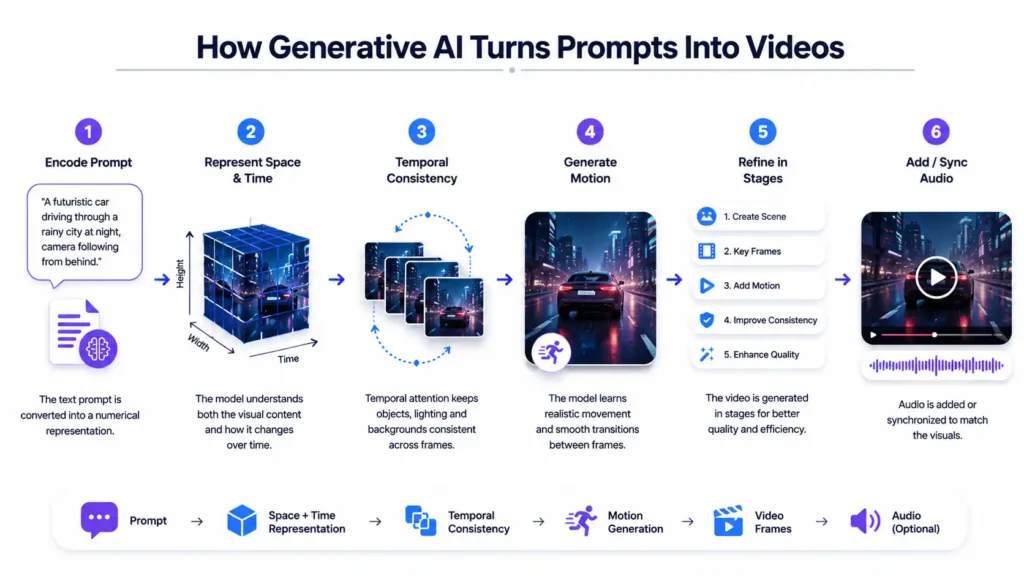
Creating those frames is only part of the challenge. The AI must also make sure they remain connected.
A person should not suddenly change clothing.
A car should not disappear between frames.
A character’s face should remain recognizable.
Lighting should remain reasonably consistent.
Movement must also make sense.
This requirement is known as temporal consistency.
Step 1: The Video Prompt Is Encoded
Video generation begins in a similar way to image generation. The user’s prompt is converted into a numerical representation.
For example:
“A futuristic car driving through a rainy city at night while the camera slowly follows from behind.”
The system needs to identify several elements:
- Futuristic car
- Rainy environment
- City at night
- Forward movement
- Camera movement
- Overall visual style
Some video models can also receive an existing picture instead of starting entirely from text. This is called image-to-video generation. The model then tries to animate the image while keeping its important visual features.
Step 2: The Model Represents Both Space and Time
An image contains spatial information: height and width. A video adds another important dimension: time.
The AI therefore needs to understand both:
- What should appear inside each frame
- How the content should change from one frame to the next
Some systems extend diffusion techniques so that multiple video frames can be processed together. Other approaches divide videos into smaller spatiotemporal patches. These patches contain information from both visual space and time. Instead of treating an entire video as millions of independent pixels, the system can process these smaller representations more efficiently.
Step 3: Temporal Attention Maintains Consistency
One of the greatest difficulties in AI video generation is keeping objects consistent. Imagine generating a video of a woman walking through a park. If every frame were created independently, her hairstyle might change between frames. Her clothes could change colour. Trees might suddenly move to different locations. That would make the video look unstable. Temporal attention helps solve this problem. It allows the model to compare information across different moments in the video. The system can use information from earlier or nearby frames when creating new ones.
This helps maintain:
- Character identity
- Object position
- Lighting
- Background details
- Movement
- Scene consistency
Step 4: Motion Must Be Generated
Video models also need to understand movement. For example, if a person raises their hand, the AI needs to generate realistic intermediate positions instead of jumping immediately from one pose to another. Motion information can be learned from large collections of videos. During training, the model observes how objects, people, cameras, shadows, and backgrounds normally change across frames. The system can then use these learned patterns when producing new clips. Some models may also use motion-related information such as optical flow, which describes how visual points move between frames.
Step 5: Longer Videos May Be Created in Stages
Generating a long, high-resolution video all at once would require enormous computing resources. Video-generation systems can therefore use multiple stages.
A simplified process might look like this:
- Create the basic scene.
- Generate important frames.
- Add movement between those frames.
- Improve temporal consistency.
- Increase the resolution.
- Add final visual details.
By separating the job into stages, the system can produce better results without processing everything at full quality from the beginning.
Step 6: Audio Can Be Added or Synchronized
Some newer generative systems also work with audio. This introduces another challenge because sound must match what is happening visually.
For example:
- Speech should match mouth movement.
- Footsteps should match walking.
- Background sounds should fit the environment.
- Music may need to match the mood or timing of the scene.
Multimodal AI models can connect representations of sound, language, and visual information to improve synchronization. This remains a rapidly developing area of generative AI.
What Text, Image, and Video Generation Have in Common
Although these systems produce very different types of content, several important ideas connect them.
1. They Learn From Large Amounts of Data
Generative models learn by identifying patterns in training data.
Language models study text.
Image models learn from visual data and text-image relationships.
Video models learn from sequences of moving visual information.
Better-quality training data can significantly improve model performance.
2. They Convert Information Into Numerical Representations
Computers do not directly understand words, photographs, or videos in the same way humans experience them.
The information is converted into numerical representations before being processed by neural networks.
These representations allow models to identify statistical relationships within the data.
3. Attention Is Important
Attention mechanisms appear throughout modern generative AI.
In language models, attention helps connect words.
In image models, attention can connect prompt concepts with visual regions.
In video models, temporal attention can help maintain relationships across frames.
4. More Computing Power Can Improve Capability
Large generative models require significant computing resources for training.
Researchers have observed relationships between model size, data, computing resources, and performance.
These relationships are often discussed through scaling laws.
However, simply making a model larger is not enough. Data quality, architecture, training methods, and evaluation also matter.
Where Generative AI Is Used Today
Generative AI is already being applied across many fields.
| Industry | Text Generation | Image Generation | Video Generation |
|---|---|---|---|
| Education | Explanations, quizzes and study material | Educational diagrams and visual aids | Learning animations and demonstrations |
| Marketing | Advertisements, emails and social-media content | Product visuals and campaign graphics | Promotional videos |
| Entertainment | Scripts, stories and character ideas | Concept art and storyboards | Scene concepts and short clips |
| Healthcare | Summaries and documentation assistance | Synthetic medical images for selected research uses | Training and simulation content |
| Software Development | Code suggestions and documentation | Interface concepts and mockups | Product demonstrations and tutorials |
These tools usually work best when supporting human professionals rather than being treated as completely independent decision-makers.
Important Limitations of Generative AI
Generative AI is powerful, but students should also understand its weaknesses.
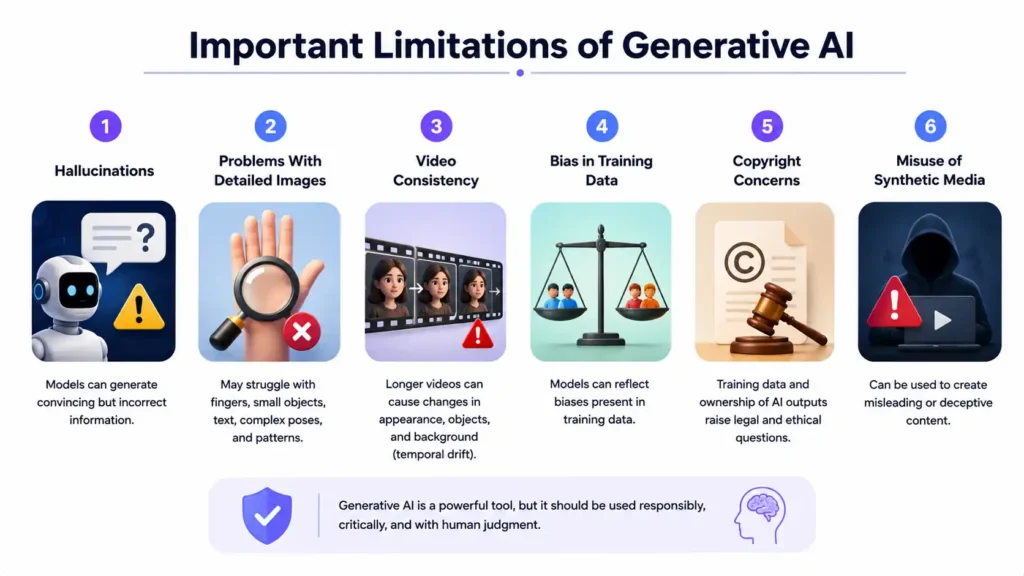
Hallucinations
Language models can generate information that sounds convincing but is incorrect. This happens because the model is generating a statistically plausible sequence of words rather than independently checking whether every statement is true. Important factual information should therefore be verified.
Problems With Detailed Images
Image generators may struggle with fine details.
Examples can include:
- Fingers
- Small objects
- Text inside images
- Complex body positions
- Repeated patterns
Modern models have improved considerably, but errors can still occur.
Video Consistency
Maintaining consistency becomes harder as videos become longer. A character’s appearance may gradually change. Objects may move incorrectly. Background details may disappear. This problem is sometimes described as temporal drift.
Bias in Training Data
AI models learn from their training data. If that data contains social, cultural, racial, gender, or ideological biases, some of those patterns may appear in generated outputs. This is one reason responsible dataset design and model evaluation are important.
Copyright Concerns
The use of copyrighted material in AI training has created ongoing legal and ethical debates. Questions include how training data should be collected, what permissions are required, and who owns AI-generated outputs. These issues continue to develop as laws and court decisions evolve.
Misuse of Synthetic Media
Generative AI can create useful educational and creative content, but similar technology can also be used to produce misleading or deceptive material.
This has increased interest in technologies that can help identify where digital content came from and whether it has been modified.
Frequently Asked Questions
Q1. What Is the Difference Between a GAN and a Diffusion Model?
A Generative Adversarial Network, or GAN, contains two main neural networks. One network generates content, while the other tries to identify whether the generated output is real or artificial. They improve by competing against each other. Diffusion models use another approach. They learn how to add noise to data and, more importantly for generation, how to reverse that process. Modern diffusion-based systems became popular because they can generate diverse and detailed visual content with relatively stable training methods.
Q2. How Does AI Know What My Prompt Means?
The AI converts words into numerical representations. During training, the model learns relationships between these representations and the data associated with them. For an image model, for example, repeated relationships between words such as “dog,” “beach,” or “sunset” and corresponding visual information help the system learn what those concepts usually look like. When you later use those words in a prompt, the model uses the learned relationships to guide generation.
Q3. Why Do AI Image Generators Sometimes Make Strange Hands?
Hands are difficult because they can appear in many positions, angles, lighting conditions, and levels of visibility. Fingers also interact with objects and frequently overlap one another. The model learns patterns from examples rather than following a fixed rule that says exactly how every human hand must be constructed. As image-generation systems improve, these mistakes are becoming less common, but they have not disappeared completely.
Q4. Can Generative AI Be Trained on My Own Content?
Yes. Existing models can sometimes be adapted using additional training methods. For image models, techniques such as LoRA and DreamBooth can help a model learn a particular subject, character, product, or visual style from a smaller custom dataset. Language models can also be fine-tuned for specialized tasks. The exact method depends on the model, available data, required output, and computing resources.
Q5. Why Does the Same Prompt Produce Different Results?
Generative models often include an element of controlled randomness. When several possible outputs are reasonable, the model does not always choose the same one. This is why running the same image prompt several times may produce different compositions. Language models can behave similarly depending on their generation settings.