
Running a small business is not easy. A small business owner has to handle many things at the same time. You may need to manage customers, sales, marketing, social media, emails, content, payments, orders, reports, and daily business tasks.
This can become stressful, especially when you have a small team or a limited budget. That is why AI tools for small businesses are becoming very useful in 2026.
AI tools can help you save time, reduce manual work, reply to customers faster, create content, improve marketing, and manage daily tasks more easily. The best thing is that you do not need to be a technical expert to use them. Many AI tools are simple, beginner-friendly, and made for normal business owners. Whether you run an online store, restaurant, coaching business, real estate business, digital agency, beauty salon, local shop, or service-based business, AI automation can help you work faster and smarter.
In this guide, you will learn what AI tools are, how they help small businesses, which tasks you can automate, and how to start using them step by step.
What Are AI Tools for Small Businesses?
AI tools for small businesses are software tools that use artificial intelligence to help with business tasks.
In simple words, AI tools can act like smart assistants. They can help you write content, create images, answer customer questions, organize data, make reports, schedule posts, write emails, and connect different apps.
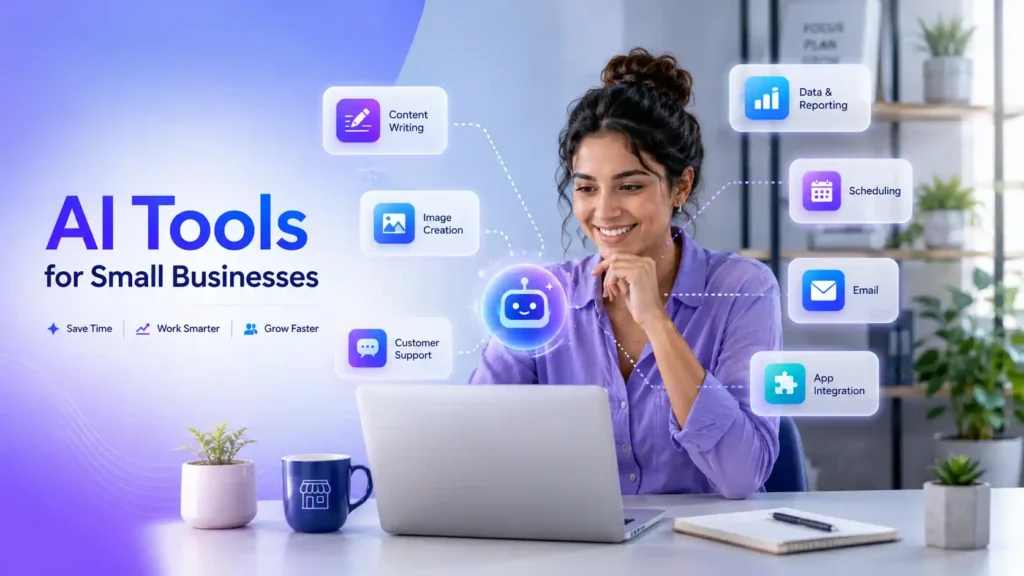
For example, instead of writing every social media caption yourself, you can use an AI writing tool to create ideas and drafts. Instead of answering the same customer questions again and again, you can use an AI chatbot. Instead of copying customer details from one app to another, you can use automation tools to do it automatically.
AI does not mean you should stop using your own thinking. You still need to review the work, check the quality, and make sure it matches your business style. AI is best when you use it as a helper, not as a complete replacement.
Why Small Businesses Should Use AI Automation in 2026
Small businesses often have one big problem: there is too much work and not enough time. Large companies usually have separate teams for marketing, sales, customer support, design, and data. But in a small business, one person may have to do everything. This is where AI automation tools can help.
AI can handle many repeated tasks, so you can focus on more important work. It can help you save hours every week. It can also help you look more professional, even if your business is small.
For example, a small online store can use AI to write product descriptions. A restaurant can use AI to create weekly social media posts. A real estate agent can use AI to write property descriptions. A coach can use AI to create email newsletters and client guides.
AI helps small businesses work faster without hiring a large team. This makes it easier to compete with bigger brands.
Business Tasks AI Can Automate
You do not need to automate your whole business at once. Start with small tasks that take a lot of time.
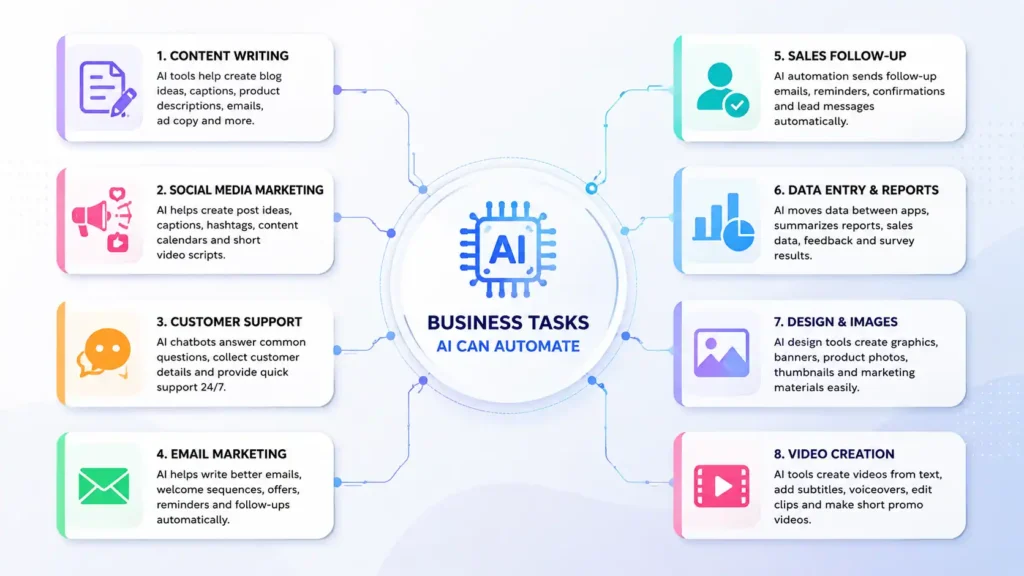
Here are some common business tasks that AI tools can help with.
1. Content Writing
Content is important for every business. You need content for your website, social media, emails, ads, blogs, and product pages.
AI writing tools can help you create:
- Blog post ideas
- Social media captions
- Product descriptions
- Email newsletters
- Ad copy
- Website content
- Video scripts
- FAQs
This saves time and helps you create content more regularly.
But you should not copy and publish AI content without checking it. Always edit the content. Add your own examples, brand tone, and business experience. This makes your content more original and useful.
2. Social Media Marketing
Social media is very important for small businesses. But posting every day can be difficult.
AI tools can help you create social media post ideas, captions, hashtags, content calendars, and short video scripts.
For example, if you own a clothing brand, AI can help you write Instagram captions for new products. If you run a bakery, AI can create weekly post ideas for cakes, offers, and customer reviews.
You can also use scheduling tools to plan posts in advance. This helps you stay active online even when you are busy.
3. Customer Support
Many customers ask the same questions again and again.
They may ask:
- What are your business hours?
- What is the price?
- Do you deliver?
- How can I book?
- What is your refund policy?
- Is this product available?
AI chatbots can answer these common questions automatically. This helps customers get quick replies and saves your time.
A chatbot can also collect customer names, emails, phone numbers, and questions. If the question is difficult, it can send the customer to a real person.
This is very useful for small businesses that receive many messages on websites, Facebook, Instagram, or WhatsApp.
4. Email Marketing
Email marketing is still a powerful way to connect with customers.
AI tools can help you write better emails. You can create welcome emails, promotional emails, discount offers, product updates, and follow-up messages.
For example, if someone signs up on your website, an automated email can welcome them. If someone leaves products in the cart, an automated email can remind them to complete the order.
This type of small business automation can increase sales and improve customer communication.
5. Sales Follow-Up
Many small businesses lose sales because they forget to follow up with customers.
AI and automation tools can send follow-up emails, reminders, meeting confirmations, and lead messages.
For example, if someone fills out a contact form, the system can automatically send them a thank-you email. It can also add their details to your customer list.
This is helpful for consultants, agencies, real estate agents, coaches, freelancers, and service businesses.
6. Data Entry and Reports
Manual data entry takes a lot of time. It can also lead to mistakes.
AI workflow automation tools can move information from one app to another. For example, when a customer fills out a form, their information can automatically go into your spreadsheet, email list, and CRM.
AI can also help summarize reports, sales data, customer feedback, and survey answers.
This makes business data easier to understand.
7. Design and Images
Small businesses need good visuals for social media, websites, ads, flyers, banners, and presentations.
AI design tools can help create images, graphics, product photos, thumbnails, and marketing materials.
You do not need advanced design skills. Many tools have ready-made templates. You just enter your text, choose a style, and edit the design.
This is useful for e-commerce stores, restaurants, salons, coaches, content creators, and local businesses.
8. Video Creation
Video content is very popular in 2026. Businesses use videos for YouTube, TikTok, Instagram Reels, Facebook, and ads.
AI video tools can help you create videos from text, add subtitles, generate voiceovers, edit clips, and create short promotional videos.
For example, you can turn a blog post into a short video. You can also create product videos, tutorial videos, or social media reels.
This helps small businesses use video marketing without spending too much money.
Best Types of AI Tools for Small Business Owners
There are many AI tools available today. But as a beginner, you do not need all of them.
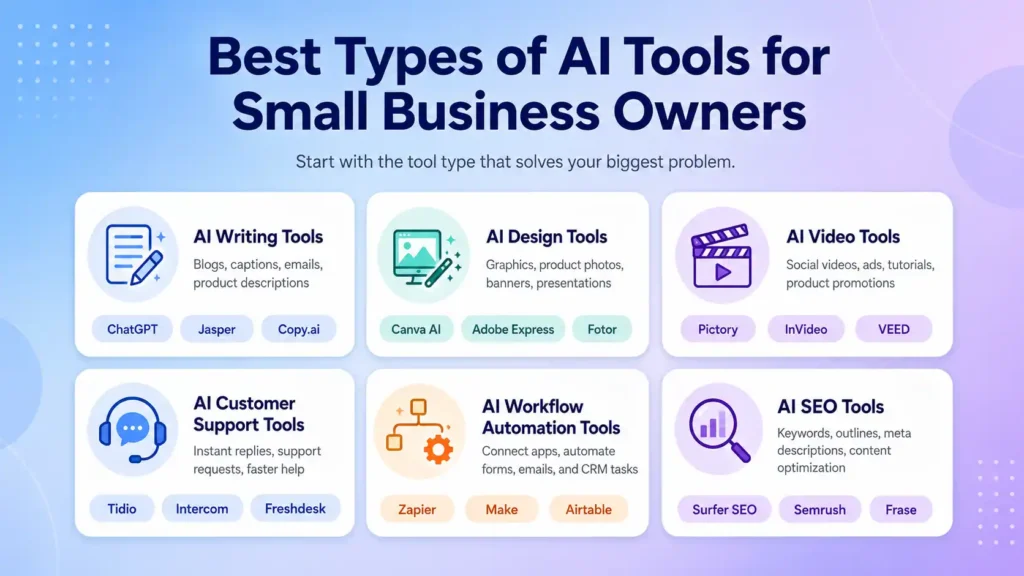
Start with the type of tool that solves your biggest problem.
AI Writing Tools
AI writing tools help you create written content. They can help with blogs, captions, emails, product descriptions, ads, and website copy.
Popular examples include ChatGPT, Jasper, Copy.ai, Writesonic, Rytr, and Notion AI.
These tools are useful if you need content regularly but do not have time to write everything from scratch.
AI Design Tools
AI design tools help you create professional visuals.
Examples include Canva AI, Adobe Express, Fotor, PhotoRoom, and similar design platforms.
These tools are good for social media graphics, product photos, posters, banners, presentations, and marketing images.
AI Video Tools
AI video tools help you create and edit videos.
Examples include Pictory, InVideo, Synthesia, VEED.io, Runway, and Lumen5.
These tools can help you make videos for social media, ads, tutorials, online courses, and product promotions.
They are useful because video creation usually takes time, but AI can make the process faster.
AI Customer Support Tools
AI customer support tools help answer customer questions and manage support requests.
Examples include Tidio, Intercom, Zendesk AI, Freshdesk, and HubSpot Service Hub.
These tools are useful for websites, online stores, agencies, and service businesses.
They can improve customer experience because people get answers quickly.
AI Workflow Automation Tools
Workflow automation tools connect different apps and make them work together.
Examples include Zapier, Make, Gumloop, Bardeen, and Airtable automation.
For example, you can connect your website form with Google Sheets, Gmail, and your CRM. When someone submits a form, all actions can happen automatically.
This is one of the best ways to save time in a small business.
AI SEO Tools
AI SEO tools help improve your website content for search engines.
They can help with keyword research, content ideas, blog outlines, meta descriptions, competitor research, and content optimization.
Examples include Surfer SEO, Semrush, Frase, Ahrefs AI features, and NeuronWriter.
These tools are helpful if you want more visitors from Google.
How to Start Using AI Automation Step by Step
Many beginners make the mistake of trying too many AI tools at once. This can become confusing.
The best way is to start slowly.
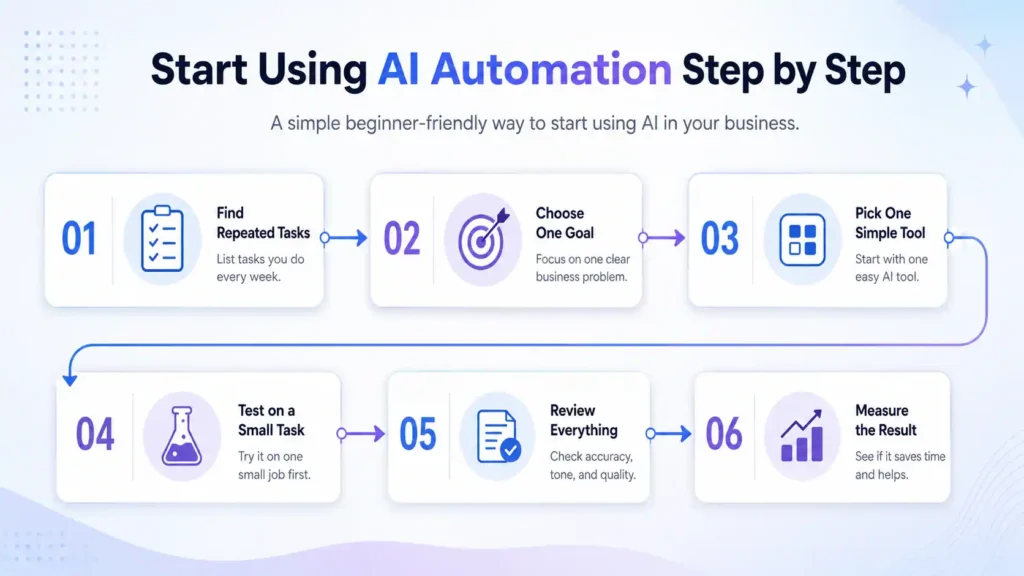
Step 1: Find Repeated Tasks
First, make a list of tasks you repeat every week.
These may include replying to messages, writing captions, sending emails, creating invoices, updating spreadsheets, posting on social media, or preparing reports.
Choose one task that takes too much time.
Step 2: Choose One Business Goal
Do not use AI only because everyone is talking about it.
Choose a clear goal.
For example:
“I want to reply to customers faster.”
“I want to create social media posts more easily.”
“I want to automate email follow-ups.”
“I want to write product descriptions faster.”
When your goal is clear, choosing the right AI tool becomes easier.
Step 3: Pick One Simple Tool
Start with one easy tool.
If you want to write content, choose an AI writing tool.
If you want to automate app work, choose Zapier or Make.
If you want to reply to customers, choose an AI chatbot.
Do not buy many tools in the beginning. Start with one and learn it properly.
Step 4: Test It on a Small Task
Before using AI for your whole business, test it on a small task.
For example, ask AI to write five product descriptions. Or ask it to create one email campaign. Or use it to generate one week of social media ideas.
Then review the results.
Step 5: Review Everything
AI can make mistakes. Sometimes it may write wrong information, weak sentences, or content that does not match your brand.
Always review AI work before using it.
You should check:
- Is the information correct?
- Is the tone suitable?
- Is it easy to read?
- Does it match your business?
- Does it sound natural?
Human review is very important.
Step 6: Measure the Result
After using AI, check whether it helped your business.
Ask yourself:
Did it save time?
Did it improve customer replies?
Did it help create more content?
Did it reduce manual work?
Did it improve sales follow-up?
If it helped, keep using it. If not, change your process or try another tool.
Real Examples of AI Automation for Small Businesses
Here are some easy examples.
A clothing store can use AI to write product descriptions, Instagram captions, size guide content, and discount emails.
A restaurant can use AI to create menu posts, festival offers, customer reply messages, and food promotion captions.
A real estate agent can use AI to write property descriptions, follow-up emails, listing captions, and client summaries.
A digital marketing agency can use AI to create content calendars, ad copy, client reports, and onboarding forms.
A fitness coach can use AI to create workout plans, email tips, social media posts, and client guides.
An e-commerce store can use AI to improve product photos, write SEO-friendly descriptions, create ads, and answer customer questions.
These examples show that AI tools can help many types of businesses.
Free vs Paid AI Tools for Small Businesses
Free AI tools are good for beginners. They help you test features and understand how AI works.
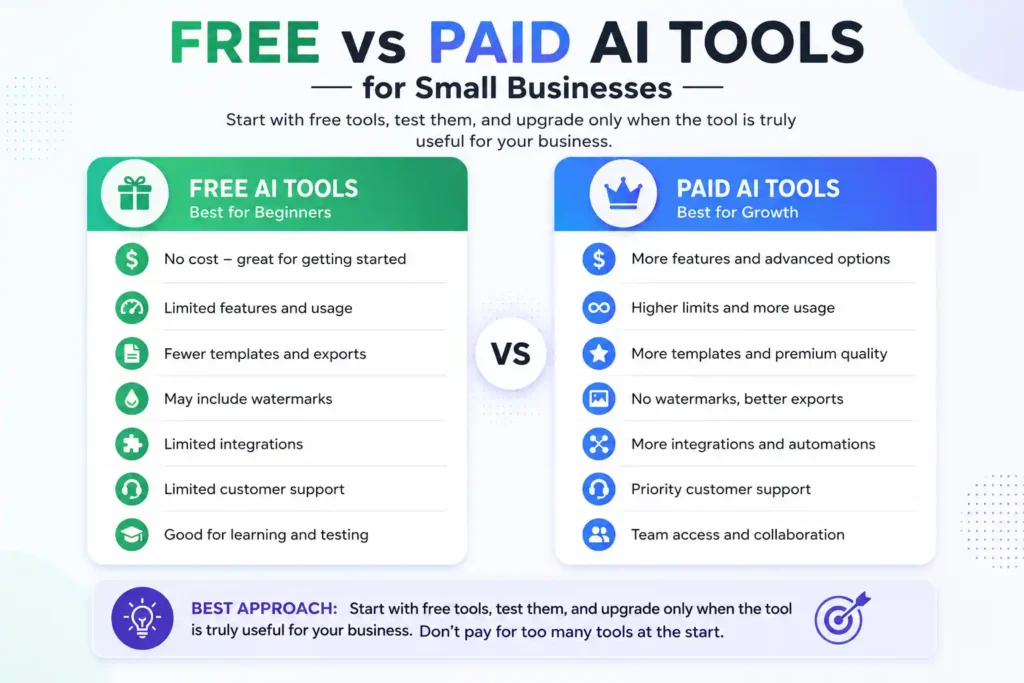
But free tools may have limits. They may offer fewer credits, fewer templates, limited exports, watermarks, or fewer integrations.
Paid tools usually offer more features. They may give better quality, more usage, team access, automation options, and customer support.
The best approach is simple: start with free tools, test them, and upgrade only when the tool is truly useful for your business.
Do not pay for too many tools at the start. Choose one or two tools that solve real problems.
Mistakes Small Businesses Should Avoid
AI is helpful, but you should use it carefully.
The first mistake is copying AI content without editing. This can make your business sound boring and generic. Always add your own style and examples.
The second mistake is using AI for every task. Some tasks need human care, especially customer complaints, legal matters, sensitive information, and important business decisions.
The third mistake is sharing private data with unknown tools. Do not upload customer passwords, financial details, private documents, or sensitive business data into tools you do not trust.
The fourth mistake is buying tools without a plan. A tool may look attractive, but if it does not solve a real problem, it is just an extra cost.
The fifth mistake is expecting perfect results. AI is useful, but it still needs clear instructions and human review.
Is AI Automation Safe for Small Businesses?
Yes, AI automation can be safe if you use it wisely.
Choose trusted tools. Read their privacy rules. Do not upload sensitive customer data unless you understand how the tool handles it.
Also, keep humans involved in important work. AI can help with speed, ideas, and automation, but the final decision should stay with you.
This is especially important for customer service, payments, legal content, health information, and private business data.
How AI Helps Small Businesses Compete with Bigger Brands
Smart automation helps small businesses save time, serve customers better, and grow with more confidence. Big companies usually have more money, more staff, and better systems. But AI tools give small businesses a chance to compete.
With the help of AI, a small business can create better content, reply faster to customers, improve marketing, manage data, and automate daily tasks.
This does not mean AI will make your business successful overnight. You still need good products, good service, and smart planning. But AI can make your work easier and faster.
In 2026, the best small businesses will not be the ones using the most AI tools. They will be the ones using the right tools in the right way.