How AI Image Generators Work: From Text Prompts to Stunning Images
Not long ago, creating a high-quality illustration or digital artwork required professional design skills, expensive software, and hours—or even days—of work. Designers would carefully sketch ideas, refine details, apply colors, adjust lighting, and make multiple revisions before producing the final image. For complex advertising campaigns, product concepts, or marketing visuals, the creative process could even take several days or weeks.
Today, artificial intelligence has transformed that workflow. Instead of manually designing every element, users simply describe their idea in a text prompt, and AI generates a complete image within seconds. Tasks that once required years of artistic experience can now begin with a single sentence, making visual creation faster and more accessible than ever before.
But how does an AI image generator understand your words and transform them into a realistic image? Does it search for existing pictures on the internet, or does it create an entirely new image from scratch?
In this guide, you’ll learn how AI image generators work behind the scenes, how text prompts are interpreted, how diffusion models convert random noise into stunning visuals, why AI sometimes makes mistakes, and how to write better prompts to generate more accurate and professional-looking images.
What Is an AI Image Generator?
An AI image generator is a software system that creates new images using artificial intelligence.
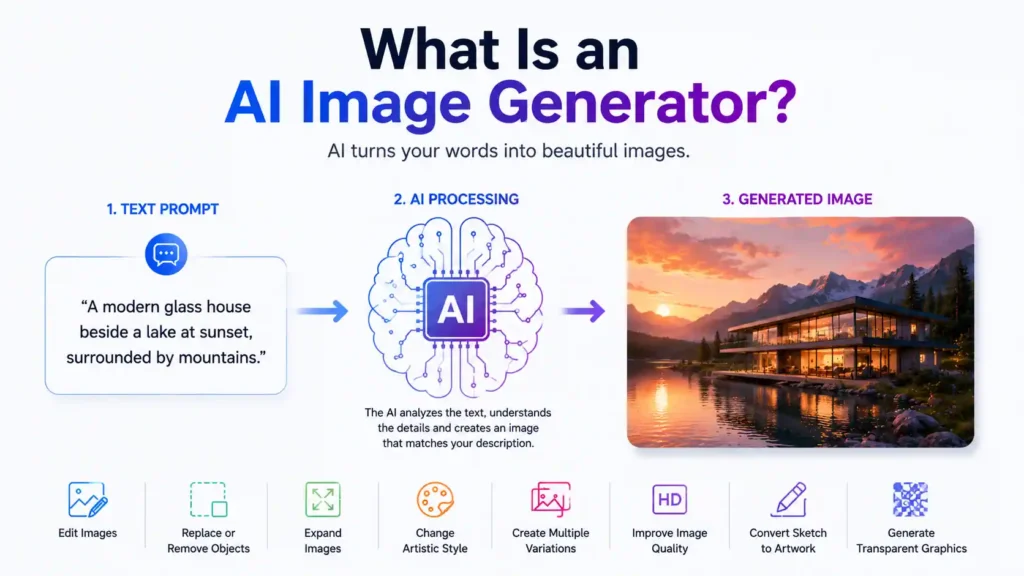
Figure 1: An overview of how an AI image generator transforms a text prompt into a high-quality AI-generated image.
The user normally enters a text description, such as:
A modern glass house beside a lake at sunset, surrounded by mountains.
The AI analyzes the words and generates an image that attempts to match the description.
Depending on the tool, an AI image generator may also be able to:
Edit an existing image
Replace or remove objects
Expand the edges of a picture
Change the artistic style
Create multiple variations
Improve image quality
Convert sketches into finished artwork
Generate transparent product graphics
AI image generation is primarily powered by deep learning models trained on very large collections of images and their corresponding text descriptions.
How Do AI Image Generators Work?
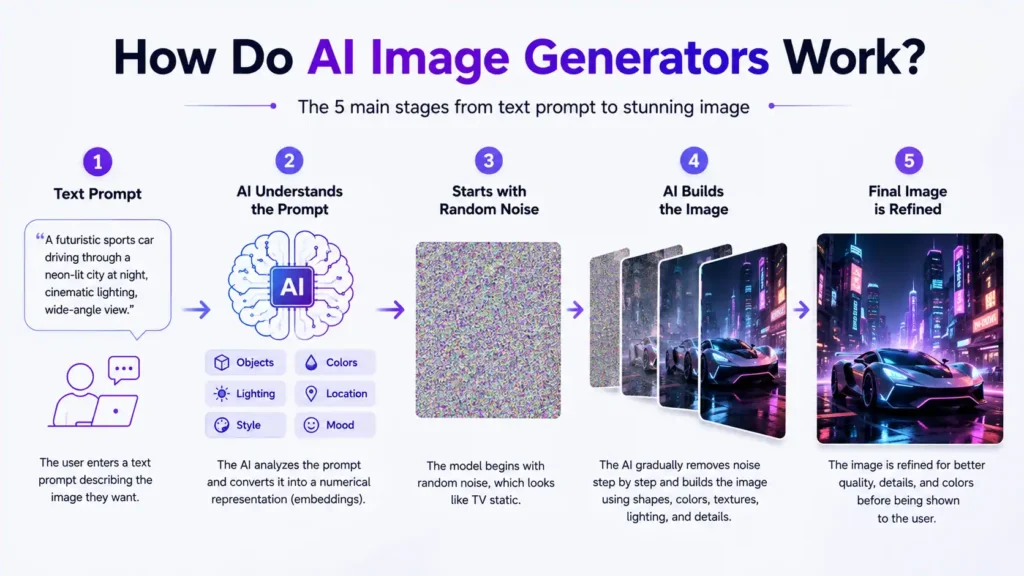
Most modern AI image generators follow a process that can be divided into five main stages:
The user writes a text prompt.
The AI interprets the meaning of the prompt.
The model starts with random visual noise.
It gradually transforms the noise into an image.
The final image is refined and presented to the user.
The process happens quickly, but several advanced AI technologies work together behind the scenes.
Figure 2: The five-step AI image generation process, from a text prompt to a refined AI-generated image.
Step 1: The User Enters a Text Prompt
The process begins with a text prompt.
A prompt is a written instruction that describes what the user wants the AI to generate.
A simple prompt might be a red sports car on a city street. A more detailed prompt might be a futuristic red sports car driving through a neon-lit city at night, cinematic lighting, realistic reflections, wide-angle view.
The second prompt gives the model more information about:
The main subject
The location
The lighting
The mood
The visual style
The camera perspective
Detailed prompts usually give the AI clearer direction, although longer prompts are not always better. The most effective prompts are specific, organized, and easy to understand.
Step 2: The AI Understands the Prompt
The image generator cannot understand language exactly as a human does. It converts the words into numerical representations called embeddings.
An embedding is a mathematical representation of meaning. Words and ideas with related meanings are placed closer together within the model’s internal system. For example, the concepts of “dog,” “puppy,” and “pet” may have related representations.
The text encoder analyzes important parts of the prompt, including:
Objects
Actions
Colors
Locations
Styles
Emotions
Lighting
Composition
For example, in the prompt:
A small robot reading a book in a quiet library.
The model identifies the main concepts:
Small robot
Reading
Book
Library
Quiet atmosphere
The AI then uses those concepts to guide the image creation process.
Step 3: The Model Begins With Random Noise
Many modern AI image generators use a technology called a diffusion model.
A diffusion model often starts with an image made of random noise. It may look similar to television static, with no recognizable objects or structure.
The AI then removes the noise step by step.
During each step, it compares the developing image with the meaning of the prompt. It gradually introduces shapes, colors, textures, lighting, and objects that match the requested description.
The process may move through stages such as:
Random noise
Basic shapes
Rough composition
Recognizable subjects
Detailed objects
Final textures and lighting
The final image appears after the model has repeated this denoising process many times.
What Is a Diffusion Model?
A diffusion model is a type of deep-learning system that learns how images can be created by reversing a noise process.
During training, noise is gradually added to real images until they become almost unrecognizable. The model learns how to reverse that process.
When generating a new image, the model starts with noise and predicts how to remove it in a way that matches the text prompt.
This method is widely used because it can generate:
Realistic images
Detailed illustrations
Artistic compositions
Different visual styles
High-quality textures
Complex lighting effects
Diffusion models are one of the main technologies behind modern text-to-image AI.
Step 4: The AI Builds the Image
As the model removes noise, it makes repeated predictions about what the image should contain.
It may decide:
Where the main subject should appear
What colors should be used
How the background should look
Which objects belong together
How light should fall across the scene
What artistic style should be followed
The model does not copy and paste one complete image from its training data. It generates a new arrangement based on patterns it learned during training.
For example, if asked to create:
A watercolor painting of a lighthouse during a storm.
The model combines its learned understanding of:
Watercolor texture
Lighthouses
Ocean waves
Storm clouds
Dramatic lighting
It then produces a new image based on that combination.
Step 5: The Final Image Is Refined
After the main image is generated, the system may perform additional processing.
This can include:
Increasing resolution
Sharpening details
Improving faces
Reducing visual noise
Enhancing colors
Correcting lighting
Creating multiple variations
Some AI image tools also allow users to select part of an image and regenerate only that area. This editing process is often called inpainting. Users may also extend an image beyond its original borders. This is commonly known as outpainting or generative expansion
How Are AI Image Models Trained?
AI image models are trained using large collections of images paired with text descriptions.
During training, the model studies relationships between visual content and language.
It may learn that:
“Golden retriever” often refers to a particular dog breed.
“Sunset” is associated with warm colors and low light.
“Oil painting” involves certain brush textures.
“Modern office” may include desks, computers, and clean architecture.
“Cinematic lighting” often creates strong shadows and dramatic contrast.
The model adjusts millions or billions of internal parameters during training. These parameters help it recognize patterns and generate new images later.
Training a large AI image model requires:
Large datasets
Powerful graphics processors
Significant computing resources
Model evaluation
Safety filtering
Human feedback
Why Can AI Generate Different Images From the Same Prompt?
An AI image generator can create different outputs from the same prompt because the generation process includes randomness.
The starting noise is different each time. Therefore, the final composition may also change.
The same prompt may produce variations in:
Subject position
Facial appearance
Background details
Camera angle
Lighting
Color balance
Artistic style
Some platforms allow users to control this randomness using a seed value. A seed is a number that determines the starting noise pattern. Using the same prompt, settings, model, and seed may produce a similar result.
Why Do AI-Generated Images Sometimes Look Wrong?
AI image generators are powerful, but they are not perfect.
They may struggle with:
Hands and fingers
Small text
Complex body positions
Multiple overlapping objects
Accurate reflections
Consistent facial details
Exact object counts
Logos and brand names
Spatial relationships
These errors happen because the model predicts visual patterns rather than understanding the physical world in the same way humans do.
For example, the model may know what a hand usually looks like but still struggle to maintain the correct number and position of fingers in a complex pose.
Newer models continue to improve, but human review is still important.
What Makes a Good AI Image Prompt?
A strong AI image prompt clearly communicates the desired result.
“A young astronaut exploring an abandoned space station, cinematic science-fiction style, blue emergency lighting, detailed environment, wide-angle composition.”
This prompt provides information about:
Subject: young astronaut
Action: exploring
Environment: abandoned space station
Style: cinematic science fiction
Lighting: blue emergency lighting
Composition: wide angle
Tips for Writing Better AI Image Prompts
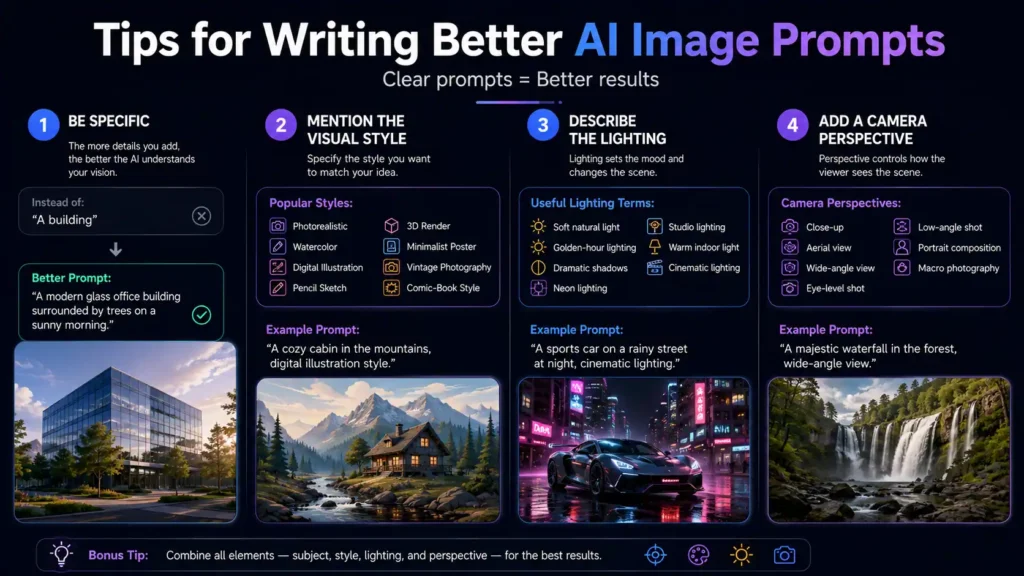
Figure 3: Four practical tips for creating clearer AI image prompts and generating more accurate visual results.
1. Be Specific
Instead of writing:
“A building”
Write:
“A modern glass office building surrounded by trees on a sunny morning.”
2. Mention the Visual Style
You can specify styles such as:
Photorealistic
Watercolor
Digital illustration
Pencil sketch
3D render
Minimalist poster
Vintage photography
Comic-book style
3. Describe the Lighting
Lighting can significantly change the mood.
Useful terms include:
Soft natural light
Golden-hour lighting
Dramatic shadows
Neon lighting
Studio lighting
Warm indoor light
Cinematic lighting
4. Add a Camera Perspective
You may include:
Close-up
Aerial view
Wide-angle view
Eye-level shot
Low-angle shot
Portrait composition
Macro photography
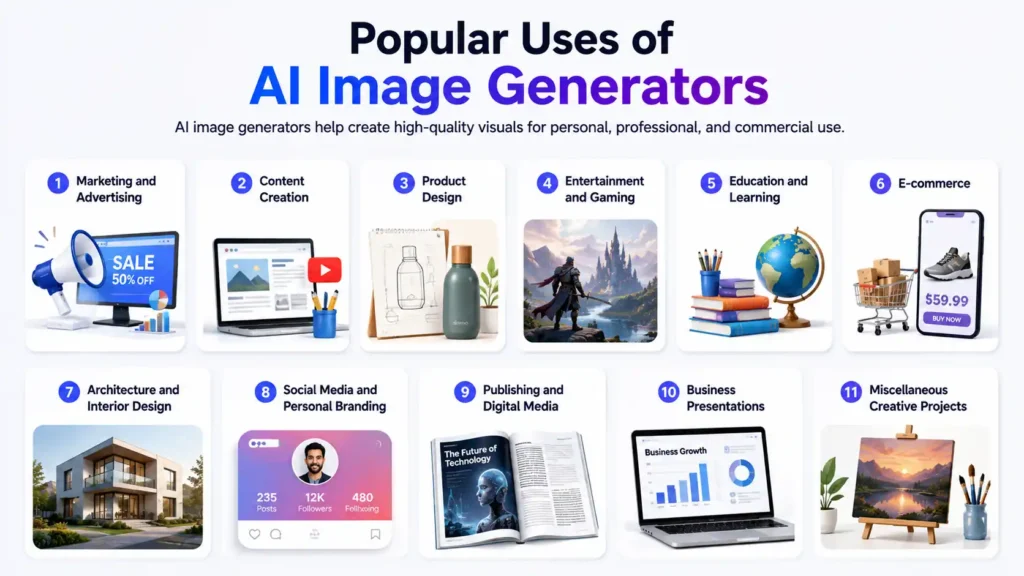
Popular Uses of AI Image Generators
AI image generators are transforming how individuals and businesses create visual content. They help save time, reduce production costs, and generate high-quality images for various personal, educational, and commercial purposes. From marketing campaigns to architectural visualization, AI-generated images are now widely used across many industries.
Figure 4: Popular real-world applications of AI image generators across different industries and creative workflows.
(i). Marketing and Advertising
Businesses use AI image generators to create eye-catching social media posts, digital advertisements, promotional banners, email campaign graphics, landing page visuals, product mockups, and marketing materials. AI enables marketing teams to produce creative assets quickly without relying entirely on traditional design workflows.
(ii). Content Creation
Content creators, bloggers, YouTubers, publishers, and website owners use AI-generated images for blog featured images, article illustrations, YouTube thumbnails, infographics, presentation graphics, and educational content. AI helps creators produce unique visuals that improve engagement and reduce content production time.
(iii). Product Design
Designers and product development teams use AI to generate concept art, packaging ideas, product visualizations, prototype designs, and creative variations before moving to final production. This speeds up brainstorming and supports faster design iterations.
(iv). Entertainment and Gaming
The entertainment industry uses AI image generation for character design, environment creation, concept art, storyboards, comic illustrations, movie pre-visualization, and game asset development. Artists can rapidly explore multiple creative ideas before finalizing their designs.
(vi). Education and Learning
Teachers, students, and educational organizations use AI-generated visuals to create diagrams, historical reconstructions, scientific illustrations, classroom presentations, learning materials, and educational infographics. These visuals make complex topics easier to understand and improve the overall learning experience.
(vii). E-commerce
Online businesses use AI image generators to create product backgrounds, promotional banners, lifestyle images, advertising creatives, seasonal campaign graphics, and product showcase visuals. This allows sellers to present products more professionally while reducing photography costs.
(viii). Architecture and Interior Design
Architects and interior designers use AI to visualize buildings, room layouts, furniture arrangements, landscaping ideas, lighting concepts, renovation plans, and architectural styles. AI-generated concepts help clients better understand design ideas before construction begins.
(ix). Social Media and Personal Branding
Influencers, freelancers, startups, and businesses create custom social media graphics, profile banners, branding assets, event posters, promotional images, and visual content that helps maintain a consistent online presence across multiple platforms.
(x). Publishing and Digital Media
Publishers, news organizations, and online magazines use AI-generated illustrations for articles, magazines, newsletters, digital publications, and editorial content when custom artwork is needed quickly.
(xi). Business Presentations
Companies use AI-generated graphics to create presentation slides, business reports, investor pitches, training materials, dashboards, and corporate documents that communicate ideas more effectively with professional visuals.
Advantages of AI Image Generators
AI image generators offer valuable benefits for businesses, designers, marketers, content creators, and individuals who need high-quality visuals quickly. They simplify the creative process, reduce dependence on expensive production resources, and make professional visual creation more accessible.
1. Faster Image Creation
AI image generators can produce complete visuals within seconds or minutes. This allows users to create blog images, advertisements, social media graphics, concept art, and product visuals much faster than traditional design methods.
2. Lower Production Costs
Businesses can reduce expenses related to photography, illustration, studio equipment, stock images, and early-stage design work. AI-generated visuals are particularly useful for testing ideas before investing in professional production.
3. Easy Creative Experimentation
Users can explore different concepts, styles, layouts, colors, and environments by adjusting a text prompt. This makes it easier to test creative directions without rebuilding an image from the beginning.
4. Multiple Design Variations
AI tools can generate several versions of the same idea within a short time. Designers and marketers can compare different compositions and choose the visual that best matches their audience, campaign, or brand message.
5. Accessibility for Non-Designers
People without advanced graphic-design or illustration skills can create useful visual content through simple written instructions. This makes AI image generation valuable for small businesses, students, bloggers, freelancers, and startup teams.
6. Rapid Concept Development
AI image generators help turn rough ideas into visual concepts quickly. Product designers, architects, game developers, filmmakers, and creative teams can use these early visuals for brainstorming, planning, and client presentations.
7. Custom Visual Creation
Unlike generic stock photography, AI tools can generate visuals based on specific subjects, settings, moods, colors, and formats. This gives users greater control over the final image and helps create content tailored to a particular project.
8. Access to Different Artistic Styles
Users can experiment with photorealistic images, watercolor illustrations, 3D renders, sketches, cinematic scenes, minimalist graphics, and many other visual styles from a single platform.
9. Improved Content Production
AI-generated images can support faster production of blog posts, social media campaigns, presentations, educational materials, advertisements, and website content. This can help teams maintain a more consistent publishing schedule.
10. Better Visual Brainstorming
Even when an AI-generated image is not used as the final design, it can provide inspiration for composition, lighting, color choices, character concepts, and creative direction.
11. Scalable Visual Creation
Businesses can produce large numbers of visual variations for different audiences, platforms, campaigns, and product categories. This is especially useful for marketing, e-commerce, and content-heavy websites.
Popular AI Image Generator Platforms
If you want to start creating AI-generated images, several platforms are available for different use cases. Popular AI image generators include DALL·E, Google Gemini, Midjourney, Adobe Firefly, Stable Diffusion, Leonardo AI, Ideogram AI, Canva AI, and Microsoft Designer. Some focus on photorealistic images, while others specialize in digital art, marketing graphics, logo concepts, typography, or commercial design. Exploring multiple tools can help you find the platform that best matches your creative workflow.
Frequently Asked Questions
Q1. How do AI image generators create images from text?
They convert the text prompt into a numerical representation and use it to guide a generative model, often a diffusion model, as it transforms random noise into an image.
Q2. What is a diffusion model?
A diffusion model is a deep-learning system that learns to generate images by reversing a process in which noise is gradually added to visual data.
Q3. Do AI image generators copy existing images?
They generally create new outputs based on patterns learned during training rather than retrieving and copying one complete image. However, users should still consider copyright and licensing concerns.
Q4. Why do AI image generators struggle with hands and text?
Hands, lettering, and complex spatial relationships require precise structures. Generative models sometimes predict these patterns incorrectly.
Q5. Which AI image generator is best for beginners?
The best option depends on the user’s goals. Some tools focus on ease of use, while others provide more control, editing features, or customization.
One Reply to “How AI Image Generators Work: From Text Prompts to Stunning Images”
unlocker
unlocker ai – The Ultimate AI Tool for Bypassing Restrictions and Unlocking Content Seamlessly!

One Reply to “How AI Image Generators Work: From Text Prompts to Stunning Images”
unlocker ai – The Ultimate AI Tool for Bypassing Restrictions and Unlocking Content Seamlessly!